
Welcome to the Shae Resource Hub for Fit for Office
Your one stop for the resources you need to make the most of Shae and your Digital Twin.
Find practical guides, session replays, FAQs and personalised support.
MP/Senator 1-1 Consult with Dr CamBook now
Live Webinars for All StaffDates and access
Contact the Support TeamContact form
FAQs & ResourcesWritten & video guides

Your experience starts here
Personalised insight, made practical
We are excited to partner with AUSactive for Fit for Office, helping our nation's leaders better understand their bodies and improve their wellbeing.
Health is about more than movement. Your Shae Digital Twin provides personalised insights into exercise, nutrition, sleep, stress, environment and more, helping you discover what works best for you.
Some insights may surprise you. Stay curious, start with one or two changes, and explore what is possible.
What are ShaeWellness and Precision Health all about?
Browse the short videos below for some more insights!
How is Personalised Health relevant to me?
How can I use it in my life?
Part 1: Welcome to the future of health
Part 2: Welcome to the future of health
Part 3: Welcome to the future of health
Part 4: Welcome to the future of health
Part 5: Welcome to the future of health
Scroll to browse all videos
Start well
Key Fit for Office resources
Begin with the question that matters most to you, then use your Digital Twin to explore a practical next step.
I've got a specific goal. How do I use Shae?
Connect your fitness, nutrition, sleep and lifestyle insights, then choose the change that feels most achievable for you.
My recommendations don't suit my life. What do I do?
Use your recommendations as a guide, explore realistic alternatives and prioritise consistent action over a perfect schedule.
For MPs and Senators
Book your 1-to-1 consultation
Make the most of your Shae Digital Twin with a personalised consultation with Dr Cam.
Explore how to turn your health insights into practical strategies for energy, wellbeing and performance, while understanding more about your strengths, working style and team dynamics.
Book your consultation
Live learning
Live Webinars for All Staff
Join Dr Cam McDonald for four interactive sessions designed to help you understand and apply your Shae Digital Twin.
How to use Shae without overwhelm, including movement, timing, food, sleep, recovery, stress and where to focus first. Know where to start with Dr Cam.
Wednesday 4 November 2026 · 8:00 am AEDT · Online
Food can be confusing, plus no or low-quality sleep is tough. Know what is right for your body and get more and better quality by understanding what your body needs to eat and rest.
Tuesday 17 November 2026 · 8:00 am AEDT · Online
Being tired is not fun. This session will help you understand what actually recovers your body and mind, and why everyone needs different recovery to perform and feel their best.
Thursday 19 November 2026 · 8:00 am AEDT · Online
Understand how your biology changes and turbocharges your goal setting. Get ready for personal breakthroughs and practical ways to make the changes last.
Wednesday 25 November 2026 · 8:00 am AEDT · Online
Meet The Challenge Support Team
We Are Here to Maximise Your Fit for Office Experience

Dr Cam McDonald
Global Expert
Dr Cam McDonald is the lead consultant for ShaeWellness, the world's leading corporate wellness platform. He is a leader, educator, scientist, motivator and father. Dr Cam studied and holds accreditation as an exercise physiologist and accredited practising dietitian, and completed his PhD in the application of nutrition and exercise in preventing chronic disease. He is a Fellow of the Australasian Society of Lifestyle Medicine and is an international leader in the application of precision health and epigenetics, educating companies, health professionals and the general public on how the whole environmental ecosystem impacts health and disease. What allows Dr Cam to leave an indelible mark on the audience is his ability to simplify the complexity of health principles, infuse hope and stimulate action. The combination of science, down-to-earth humour and elegant simplicity of truth makes him accessible, relatable and one of the best speakers in precision health and epigenetics.

Katey Leigh
Health Program Leadership
Holding two decades in public and private corporate sectors, Katey is an enthusiastic fan of personalised health, a direct result of her own experience. Originally from Vancouver, Canada, and now on the Sunshine Coast in Queensland, Katey holds a Master of Professional Communications specialising in International and Intercultural Communications, three international peer-recognised awards and a Personalised Health Coach endorsement. Combining her professional background with her personal passion for health and wellness inspires her every day. Katey has a specialisation in the area of biologically driven communication, leadership and relational tendencies. This focus on the human psyche guides powerful shifts for leaders and staff members. Healthy communication starts with a healthy you.
A smoother scan
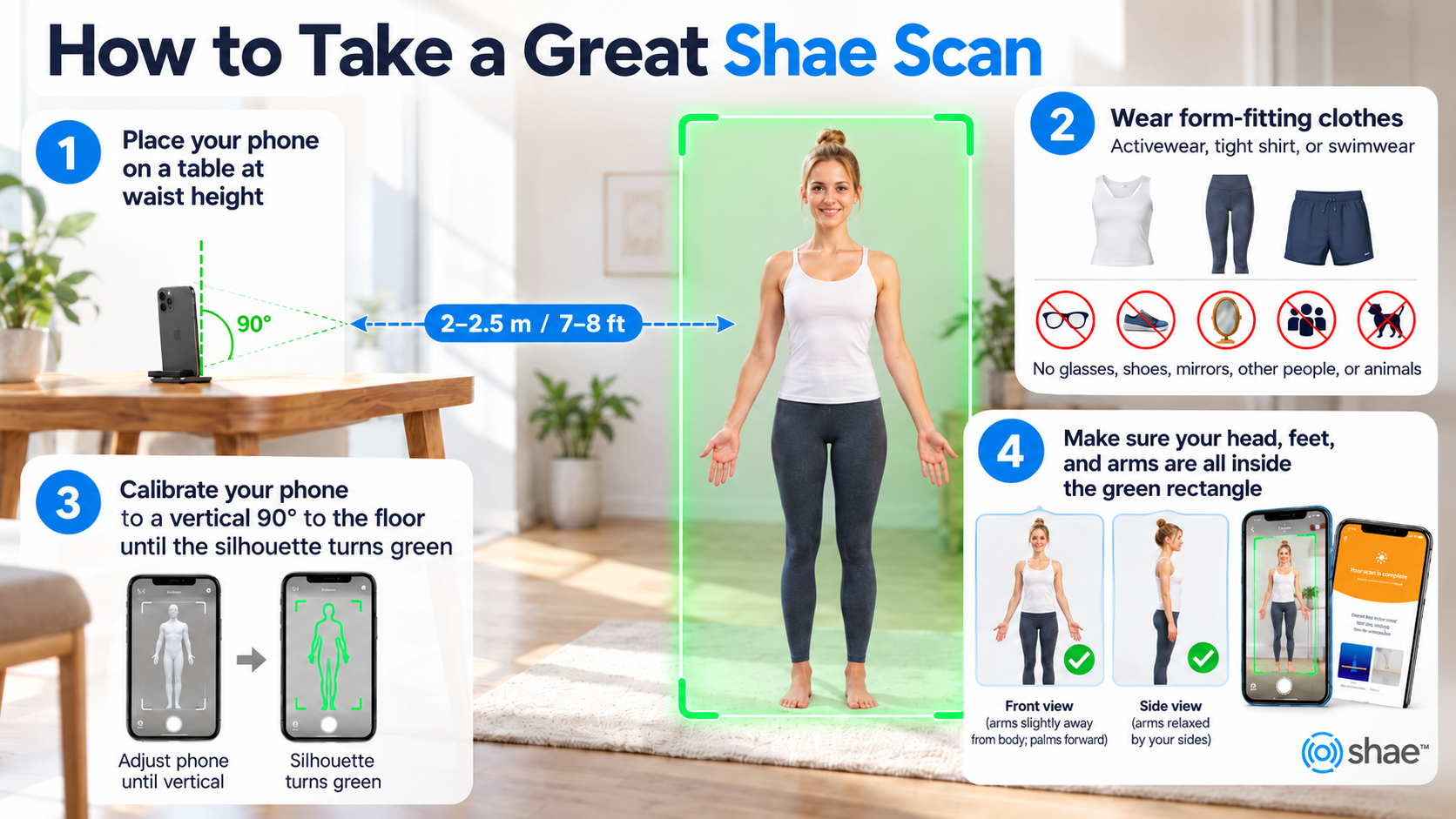
How to take a great Shae scan
Use this guide when you are ready to capture the photos used in your Shae experience.
Evidence and context
The science behind Shae
Explore published research and ongoing work connected with cardiovascular, metabolic and workplace wellbeing applications.
Protected by design
Your Privacy & Data Security
Your health information is personal, and protecting it is a responsibility we take seriously.
Shae collects information you choose to provide, including photographs, health and lifestyle responses, to create and refine your personalised Digital Twin.
Your individual health profile is not shared with Parliament House or AuSActive. Access is restricted to authorised Shae personnel where necessary for technical support, account management and service delivery. Any program reporting is intended to be de-identified.
Your information is protected using encryption in storage and transmission, alongside access controls and established information-security practices.
All data is stored and processed on-shore in Australia.
You remain in control. You can access your information, cancel your account and request deletion of your personal data in accordance with our privacy and retention policies.
For further details, please contact privacy@precisionhealthalliance.org.
Frequently Asked Questions
You have questions, we have answers. Read below or contact the support team anytime.
Your Shae Digital Twin is available through the Shae Wellness app and the PH360 web platform.
After registering for Fit for Office, you'll receive instructions for accessing your personal account.
Getting started:
Check your inbox for your Shae registration or invitation email.
Follow the instructions to activate your account.
Complete your initial personal profile and measurements.
Explore your personalised Digital Twin once your results are available.
You can access your profile through the Shae Wellness app or, if you're having trouble with the app, through the web platform at PH360.me.
Both access options are designed to help you explore your personalised recommendations.
Not receiving your email?
Start by checking your spam or junk folder. Make sure you're checking the email address you registered with.
If you still haven't received anything, use the contact form on this page and select I haven't received my registration email.
If your email address was entered incorrectly, please contact support rather than creating a second account.
Having trouble accessing the app?
Try the web platform first. If your profile is available there, you can continue exploring your Digital Twin while we help you resolve your app issue.
If neither option is working, contact the Shae support team.
Remember: You don't need to understand everything immediately. Your first goal is simply to access your Digital Twin and begin exploring.
This is one of the most common reactions people have when they first experience Shae.
Your Digital Twin contains personalised information about your nutrition, fitness, environment, thinking, social tendencies, recovery, lifestyle and more.
It's exciting, but it can also feel like a lot.
The biggest mistake is trying to change everything at once.
Instead, begin with one simple question:
What's one area of my health or wellbeing that I'd really like to improve?
For example:
More energy: Explore your daily rhythms, nutrition, sleep and recovery.
Better fitness: Explore exercise type, intensity and timing.
Better nutrition: Start with your personalised food recommendations.
Less stress: Explore Mind, Genius and lifestyle insights.
Better focus: Look at your cognitive tendencies, environment and daily rhythms.
Better overall wellbeing: Choose whichever area feels most relevant to you.
Once you've chosen an area, look for one or two recommendations you can realistically try.
You can also use your Digital Twin's chat functionality to explore questions about your profile, such as:
“I want to improve my energy levels. Based on my profile, where would you suggest I start?”
Treat the response as a starting point for exploration and ask follow-up questions.
Our recommendation:
Choose one or two changes, experiment with them, and notice how you feel.
You might discover that small adjustments to your exercise, food choices or daily routines make a meaningful difference over time.
You don't need to become an expert in your Digital Twin. Just get curious and start somewhere.
One of the most valuable ways to use Shae is to start with a goal that's personally meaningful to you.
Rather than exploring every recommendation, you can use your Digital Twin to investigate the areas that could be most relevant to that goal.
Step 1: Identify your goal.
This might be:
Improving fitness or exercise performance.
Having more energy during the working day.
Improving sleep and recovery.
Managing stress more effectively.
Improving concentration and productivity.
Eating in a way that better supports your lifestyle.
Improving your overall health.
Step 2: Ask your Digital Twin about that goal.
For example:
“I'd like to have more energy throughout the afternoon. Which parts of my profile should I explore?”
Or:
“I'm training for an event. How can I use my fitness recommendations to support my training?”
The aim is to use your personalised profile to guide a more relevant conversation.
Step 3: Explore the related sections.
Most goals are influenced by more than one area of your health.
For example, improving fitness might involve exercise recommendations, but also sleep, nutrition, recovery and stress.
Improving concentration might involve your working environment, daily rhythms, breaks, sleep and lifestyle.
Step 4: Choose practical changes.
You don't need a complicated plan.
Choose one or two actions that are achievable within your current routine.
Step 5: Review your experience.
Notice your energy, comfort, enjoyment, performance or other relevant outcomes.
If something isn't helping or doesn't fit your lifestyle, explore a different recommendation.
Shae is intended to help you make more informed decisions about yourself, not create another list of things you must do.
For medical conditions or significant health concerns, use your healthcare professional alongside your Digital Twin.
This is an important question, particularly when you're working in an environment as demanding and unpredictable as Parliament House.
Your Shae Digital Twin may recommend particular times of day for exercise, eating, recovery or other activities.
These recommendations are intended to help you understand how your individual rhythms may influence how you feel and perform.
But they are not rigid rules that you must follow.
For example, Shae might suggest that a particular time of day is more suitable for a certain kind of exercise.
That doesn't mean exercising at another time is automatically bad for you.
It simply gives you an additional consideration when deciding how to organise your day.
What if the recommended time isn't possible?
First, look at the reason behind the recommendation.
Is it related to your energy, recovery, exercise intensity or daily rhythm?
Then consider what aspects of the recommendation you can realistically apply.
You might not be able to change when you exercise, but you may have more flexibility around:
The type of exercise you choose.
How intensely you exercise.
How long you exercise.
How you warm up and recover.
How you organise other activities around exercise.
You can also ask your Digital Twin:
“I can only exercise at 6 am, but my profile suggests a different time. What should I consider based on my recommendations?”
The important thing is to keep moving.
Regular physical activity provides substantial health benefits, even when you can't exercise at your preferred or recommended time.
Use the timing information to inform your choices, not to make your life more difficult.
Your nutrition recommendations are designed to help you explore foods and eating patterns that may suit your individual profile.
However, your Digital Twin doesn't necessarily know everything about your food preferences, availability, budget, cultural background or daily routine.
That's why it's important to apply the recommendations practically.
You don't need to eat every food that appears in your profile.
Instead, look for patterns and opportunities.
Start with foods you already eat and enjoy.
Are some of them recommended in your profile?
Are there simple alternatives you could try?
Could you make one change to breakfast, lunch, dinner or snacks?
For example, if your profile suggests a food that you can't easily find, consider asking your Digital Twin about more accessible alternatives.
“This food isn't available where I shop. What similar options could I consider?”
Or:
“I often eat lunch at Parliament House. How can I use my food recommendations when choosing meals?”
Remember that nutrition is about your overall eating pattern, not just individual foods.
General evidence-based nutrition principles, including dietary variety, adequate nutrients and appropriate portions, remain important.
Our recommendation:
Begin with the foods that are easy, affordable and enjoyable to include.
You don't need to create an entirely new diet to start improving how you eat.
If you have food allergies, medical dietary requirements or a condition requiring specialist nutrition advice, follow your clinician's guidance.
This is one of the most interesting parts of exploring a personalised health profile.
When people first see their Digital Twin, they often discover three different types of information.
1. Things that feel exactly right.
You might see recommendations that reflect things you've naturally enjoyed or found effective throughout your life.
These can help you understand why certain habits seem to work well for you.
2. Things that make sense but suggest an opportunity to improve.
You might discover recommendations about exercise, recovery, food or lifestyle that seem logical but aren't things you're currently doing.
These can be useful starting points for change.
3. Things that seem completely different from what you expected.
This is where curiosity becomes particularly important.
A recommendation might differ from your usual habits, previous experiences or assumptions about yourself.
That doesn't automatically mean it's wrong, but it certainly doesn't mean you must accept it without question.
What should you do?
Start by checking that the information you entered is accurate.
Then consider whether the recommendation is describing a possible tendency, rather than something that always describes your current behaviour.
For example, your habits may reflect your work environment, responsibilities or lifestyle rather than your preferred circumstances.
Explore the explanation, ask questions and look for other related insights.
You can ask your Digital Twin:
“This recommendation doesn't feel accurate for me. Can you help me understand what it means and what I should consider?”
If the information still doesn't make sense, you can contact the Shae support team.
Our number one rule is to get curious.
Your Digital Twin is a tool to help you understand yourself more deeply, not an infallible description of who you are.
Keep what is useful, question what doesn't fit, and remember that you don't need to change everything.
Your personal health information is sensitive, and we understand that privacy is particularly important in a workplace environment.
Your individual Shae Digital Twin is for you.
Parliament House and AUSactive are not intended to have access to your personal health profile, individual recommendations or private Digital Twin conversations through the Fit for Office program.
Program organisers may receive agreed participation information and de-identified, aggregated reporting where appropriate, rather than identifiable personal health results.
Your health information should not be shared with colleagues through the program unless you separately and explicitly agree to a feature that permits specified information to be shared.
How is my information used?
Shae processes information you provide to create and support your personalised Digital Twin experience.
Further details about collection, storage, service providers, retention and data rights are explained in Shae's Privacy Policy.
Can I delete my information?
You can request deletion of your Shae account and associated personal information.
Requests will be handled according to Shae's privacy obligations and any applicable legal retention requirements.
To make a request, contact:
You can also use the contact form on this Hub for general privacy questions.
We encourage you to review the Privacy Policy before providing personal information.
Your participation in Fit for Office should help you become more informed about your own health, without requiring you to disclose your private health profile to your employer.
As part of Fit for Office, we'll be providing opportunities to learn more about your Digital Twin directly from Dr Cam McDonald.
For MPs — One-to-one consultation
MPs can book an individual session with Dr Cam to explore their personalised health insights.
These appointments are designed to help you better understand your Digital Twin and identify practical ways to apply your recommendations.
Appointments are scheduled for 25 minutes.
Before your session, we recommend:
Completing your Digital Twin profile.
Exploring your recommendations.
Identifying one or two areas you'd like to discuss.
Bringing questions about your health, performance, recovery or lifestyle.
To reserve a time, select Book My Consultation at the top of this page.
After booking, you'll receive confirmation and reminders before your appointment.
For parliamentary staff — Live webinars
When you registered for the Shae Digital Twin component of Fit for Office, you were automatically included in our webinar invitations.
You don't need to register separately.
Our live sessions are designed to help you understand and apply your Digital Twin, explore common questions and discover practical ways to get more from the experience.
November sessions:
4 November: Live online webinar.
11 or 12 November: Live in-person session with Dr Cam — date to be confirmed.
17 November: Live online webinar.
19 November: Live online webinar.
25 November: Live online webinar.
Online joining links and session times will be sent to you by email.
We'll also send reminders so you know when sessions are coming up.
Not receiving the invitations?
Check your spam folder first, then use the contact form on this Hub so we can investigate.
Can't make a session?
You can still explore the videos, explanations and FAQs on the Shae Wellness Hub.
And remember, you can ask questions through your Digital Twin or contact our team if you need additional support.
The goal is simple: to help you get more value from your Digital Twin and make meaningful changes that work for your life.
This Shae™ app onboarding question is referencing your genetic sex chromosomes of XX for female; and XY for male at birth. This genetic chromosome sequence determines different organ formations and hormonal functions and flows in the human body from a medical and scientific standpoint. This question is not referring to gender identity, which is outside of this scope. Because Shae focuses on the unique genetic and epigenetic makeup of a person, Shae needs to know each user's biology at birth to provide the most relevant advice to an individual.
ShaeWellness operate a highly secure system and are approved by some of the most secure financial and tech companies in the world. Secure storage and data handling processes are applied to all data. All data is stored within secure AWS Cloud Services. As part of Shae's Information Classification Standard, controls are defined and identity access management procedures are in place to prevent unauthorized access to data as per the International Organization for Standardization (ISO27001) and the General Data Protection Regulation (GDPR). ShaeWellness authorized staff are the only authorized persons who will have access to any personal data for the purpose of conducting the challenge and reporting de-identified trends to the client company.
All data gathered by ShaeWellness is used for analyses within Shae's ecosystem for the purpose of calculating and providing user recommendations and improving the user's experience. There are no external providers that will have access to any personally identifiable data, external to Shae's system. Non-personally identifiable information (i.e. data that cannot be traced back to an individual by an external provider) is exchanged with third parties for tracking app usage and activities such as crashes, bugs or click rates however no user data besides a non-identifiable ID is used in communication with third party analytics providers. If a participant chooses to connect their Apple Health or Google Fit app to activate the 'Wearables' feature inside the Shae app, then the participant is choosing to share additional information into Shae (this is a one-way authorization, and Shae does not share any data with Apple or Google Fit). In order to be able to participate in the Immersion, you will be required to accept the ShaeWellness privacy policy. For more information on how ShaeWellness handles your personal information, you may wish to read its Privacy Policy, available here.
Challengers will have access to their own personal profile created inside the app via photo scans, surveys or wearables, as well as insights generated by ShaeWellness. This will be accessible inside each participant's mobile application. You will learn your HealthTypeTM, one of six psycho-social profiling categories similar to a personality profile, built upon deeper science than just psychology. Participants can learn the HealthType of others in the challenge to apply healthy social and interpersonal insights. Once the challenge is finished, this information will not be available, so make the most of it while you can!
This video explains participant information, challenge outcomes and benefits. This whitepaper highlights benefits and results of the 30-day challenge.
All the support you need
Need a hand? We are here to help.
Whether you are having trouble accessing Shae, have a question about your Digital Twin, or want to get more from your experience, send the team a message.
No question is too small. Tell us what you need and we will connect you with the right person.